
Comparing CTR tools usually starts with a pricing page and ends in a sales call. Some platforms hide per-visit costs until a demo, which makes it hard to judge whether a Kraken alternative fits your budget or your campaign volume.
This article gives you a pricing checklist to run against CTRTool: published rates, what credits and visits actually deliver, plan capacity, and the proof behind each campaign visit. By the end, you will know whether the price and the evidence justify switching.
What Is CTRTool? Campaign Types, Coverage and Who It Serves
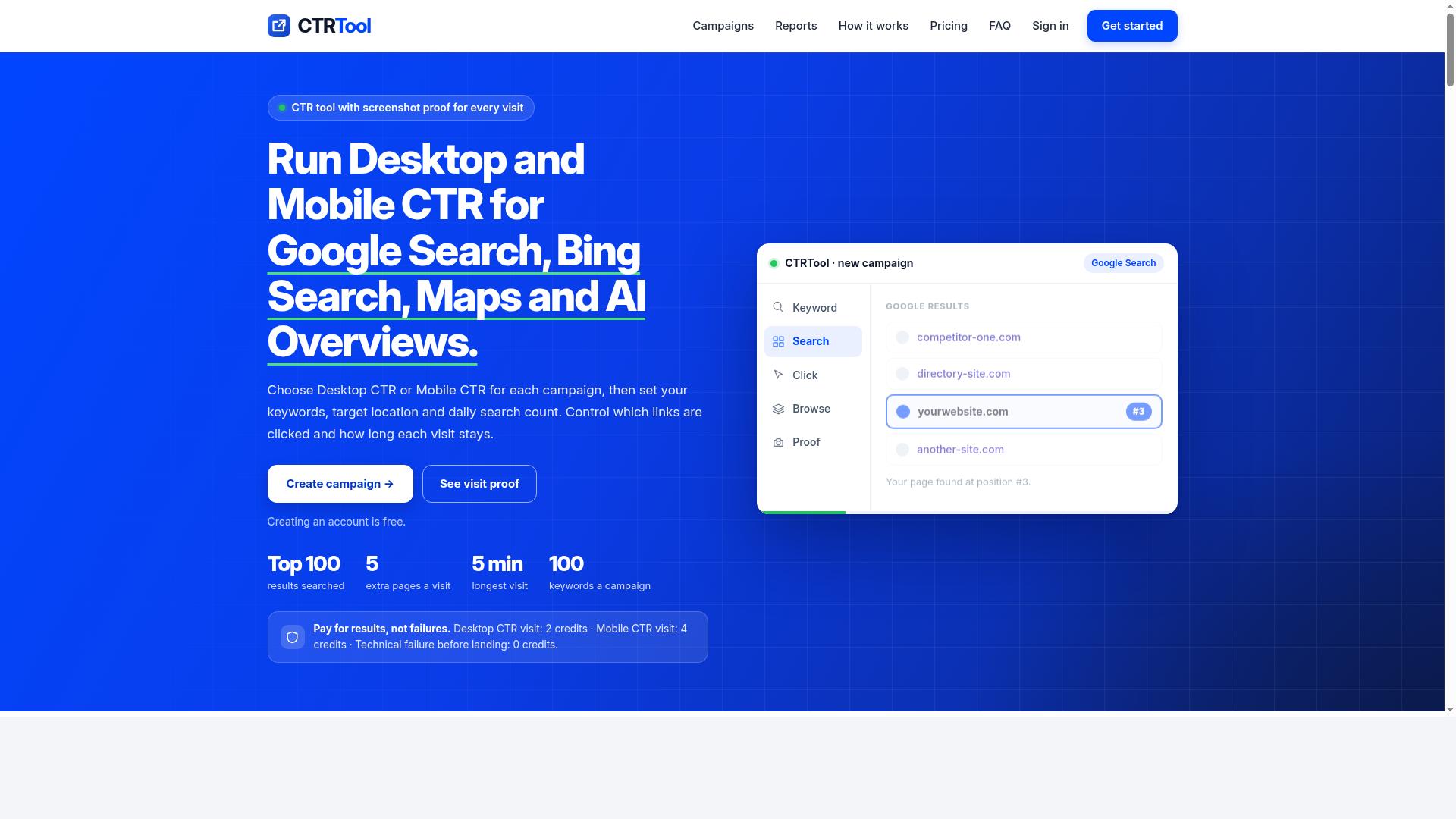
CTRTool is a SaaS platform that runs click-through-rate (CTR) campaigns across Google Search, Bing Search, Google Maps, and AI Overviews, using simulated organic visits to influence search rankings. In plain terms, it is CTR manipulation software built to send realistic organic traffic simulation to pages and listings you choose.
The tool exists because CTR signals remain one part of how search engines judge relevance. CTRTool lets SEO practitioners test and act on that signal in a structured, trackable way rather than guessing.
CTRTool organises its work into four campaign types, each built around a different surface where clicks matter.
- Google Search CTR: target a search keyword, click the organic result, choose Desktop or Mobile, and work within the Top 100 results, including internal pages.
- Bing Search CTR: the same keyword-and-result approach applied to Bing.
- Google Maps CTR: find a business listing and click its website link, scanning up to 50 listings with city targeting.
- AI Overview CTR: find your website inside the overview and click its source link, with attention to citation order.
Each campaign can be set to desktop or mobile visits, so the traffic profile matches the device your audience actually uses. That choice matters when you are trying to keep click patterns believable.
Campaign setup goes well beyond picking a keyword. A single campaign supports up to 100 keywords, with a search depth of up to 100 results. You define the target URL, internal page URLs, and link text, and you can control click order and scrolling time.
Each visit can include up to five additional pages and run for up to five minutes total, which supports dwell time and bounce rate reduction goals rather than quick hit-and-run clicks. Daily search counts can be set to happen now, spread out, or with a gap, alongside days, hours, and time zone. Daily goals reset at 00:00 UTC.
Coverage is global. You can target by country, state, and city, or select Any country when you want a mixed set of locations. This geo-targeting is what makes campaigns usable for local SEO work as well as national keyword pushes.
Delivery runs through Desktop Chrome windows and real Android phone sessions, matched to the target location through managed proxy routes. Reports show full visit paths, search and website screenshots, and keyword positions over time, covering Search positions, Maps listing order, and AI citation order. Custom form filling or other custom actions are available through support with a separate agreed one-time fee.
CTRTool is aimed squarely at SEO practitioners and agencies running campaigns for their own sites or for clients. The keyword limits, location targeting, and position reporting suit people who manage multiple campaigns and need evidence of what changed.
If you are comparing it against a Kraken CTR manipulation tool alternative, the useful question is not just what a campaign costs. It is whether the tool covers the surfaces you care about, whether it targets the right locations, and whether it gives you reporting you can act on. Those are the criteria this checklist keeps returning to.
How CTRTool Compares on the Kraken Alternatives Pricing Checklist
When evaluating CTR manipulation tools like Kraken, a structured pricing checklist helps uncover hidden costs and value differences. Here is how CTRTool measures up on two critical items.
Kraken and many similar tools keep their pricing vague or rely on credit systems that are hard to decode. That makes it tough for agencies and SEOs to forecast a real subscription cost before committing.
CTRTool takes the opposite approach. Its tiered pricing is published openly, and the credit-to-visit math is spelled out. The two checklist items below show exactly where that transparency matters most.
Checklist Item 1: Transparent, Published Pricing
Unlike many CTR tools that hide costs behind a sales call, CTRTool publishes its monthly plans directly on its website, starting at $59 per month. Every price is in USD and listed on the site, so there is no custom quote step.
That matters for agencies juggling client budgets and for solo SEOs comparing CTR manipulation software. A published price turns a guessing game into a simple line item.
- Starter: $59/month for 2,000 credits
- Growth: $125/month for 5,000 credits, marked Recommended
- Scale: $399/month for 20,000 credits
- Agency: $699/month for 40,000 credits
Creating an account is free, and the site notes a limited launch price that rises 30% on November 15. Custom development carries a separate, agreed one-time fee. By contrast, Kraken's pricing is not publicly detailed, which is typical of tools that push buyers toward a sales conversation before sharing numbers.
Checklist Item 2: What Each Plan Actually Delivers (Credits vs. Visits)
CTRTool's credit system converts directly to visits: 2,000 credits equal up to 1,000 desktop CTR visits or 500 mobile CTR visits, giving users a clear picture of cost per visit. Desktop visits cost 2 credits each, while mobile visits cost 4 credits each.
Here is how each plan maps out in practice:
| Plan | Credits | Desktop Visits | Mobile Visits |
|---|---|---|---|
| Starter | 2,000 | 1,000 | 500 |
| Growth | 5,000 | 2,500 | 1,250 |
| Scale | 20,000 | 10,000 | 5,000 |
| Agency | 40,000 | 20,000 | 10,000 |
Two smaller rules sharpen the picture. A verified search without a match costs 1 credit, and a technical failure before landing costs 0 credits. Users pay only for successful visits.
Compare that with Kraken's credit system, which may involve variable costs or fees that are not clearly disclosed. For pricing comparison across SEO tool alternatives, the ability to calculate exact cost per visit is a genuine advantage. Unused credits also roll over while a subscription stays active, though they expire when cancellation takes effect.
CTRTool Pricing and Plans in Detail
CTRTool offers four monthly subscription tiers, Starter, Growth, Scale, and Agency, each with a set number of credits that translate to desktop or mobile visits. The structure is straightforward: pick a credit volume, then spend those credits on the campaign types you need.
Every plan is month-to-month with no long-term contract required, so you can adjust or stop your subscription as your campaigns change. Creating an account is free, which lets you review the dashboard before committing to a paid tier.
One timing detail matters for budgeting. The site displays a limited launch notice stating prices rise 30% on November 15, so the figures below reflect current published rates. The two sub-sections that follow break down the monthly costs and visit capacity of each tier, then explain how the credit model charges only for completed visits.
Starter, Growth and Scale: Monthly Costs and Visit Capacity
The Starter plan at $59 per month provides 2,000 credits, enough for 1,000 desktop visits or 500 mobile visits, making it suitable for small websites or testing. It fits solo SEOs and site owners who want to run a focused keyword targeting campaign without a large budget commitment.
Growth sits at $125 per month for 5,000 credits, covering up to 2,500 desktop or 1,250 mobile visits. It is marked Recommended on the pricing page, and the capacity suits agencies managing several client sites at once.
Scale is priced at $399 per month for 20,000 credits, which supports up to 10,000 desktop or 5,000 mobile visits. High-volume campaigns, multiple geo-targeting markets, or steady click velocity across many keywords fit this tier best.
All plans include access to every campaign type, including Google, Bing, Maps, and AI Overviews, along with features such as screenshot proof of delivered visits. The table below summarizes the published rates.
| Plan | Monthly Price | Credits | Desktop Visits | Mobile Visits | Best For |
|---|---|---|---|---|---|
| Starter | $59 | 2,000 | 1,000 | 500 | Solo SEOs and small sites |
| Growth | $125 | 5,000 | 2,500 | 1,250 | Agencies with multiple clients |
| Scale | $399 | 20,000 | 10,000 | 5,000 | High-volume campaigns |
Unused credits roll over while your subscription stays active, which helps during slower campaign periods. They expire once a cancellation takes effect, so plan credit use around your billing cycle.
The Pay-for-Results Credit Model and No-Charge Technical Failures
CTRTool operates on a pay-for-results model: credits are consumed only when a visit is successfully completed, and technical failures before landing are not charged. The published credit costs are simple to track.
- Desktop CTR visit: 2 credits
- Mobile CTR visit: 4 credits
- Verified search without a match: 1 credit
- Technical failure before landing: 0 credits
Under this model, technical failures before landing do not deduct from your balance, so you pay only for visits that actually reach your page.
This contrasts with tools that charge per attempt or bury extra costs in add-ons. With a results-based credit system, the incentives line up: CTRTool earns when campaigns deliver completed visits, not when attempts fail.
The model also supports careful budget planning for organic traffic simulation. Because mobile visits cost double the desktop rate, you can weight your credit spend toward whichever device mix matters most for your keyword targeting and geo-targeting goals, and roll any remainder into the next month while your plan remains active.
Features That Matter When Evaluating Alternatives
When comparing CTR manipulation tools, features like proxy quality, CAPTCHA handling, and realistic session behavior separate effective tools from risky ones. Price alone tells you little about whether a platform can deliver visits that look and behave like genuine searches. The technical checklist below covers what to examine before you commit to any subscription.
Proxy quality comes first. Residential proxies with rotating IP addresses are the baseline for avoiding detection, because datacenter IPs are easy to flag and can put your domain at risk. A tool that routes every visit through the same small pool of addresses creates patterns that search engines can spot quickly.
CAPTCHA solving matters for continuity. Searches that hit a challenge and stall produce nothing useful. Built-in CAPTCHA handling keeps visits moving without manual intervention, so a campaign does not quietly lose a share of its intended activity.
User-agent spoofing and browser fingerprinting determine whether a visit resembles a real user or an obvious bot. Check that a platform varies these signals across visits rather than sending identical headers every time. Search ranking manipulation depends on this layer working consistently.
Session duration and dwell time shape how a visit is perceived. Adjustable settings let you avoid instant bounces and support bounce rate reduction by keeping sessions realistic. CTRTool allows visits up to 5 minutes with up to 5 additional internal pages, giving campaigns room to mimic natural browsing depth.
Click velocity is the pacing control that simulates organic patterns. Controlled timing between clicks, rather than bursts of activity, is what keeps a campaign from looking mechanical. Pair this with precise keyword targeting and geo-targeting so visits land on the right terms from the right locations.
CTRTool addresses these areas through its campaign setup. It offers configurable session settings for duration and internal page depth. For accountability, it provides screenshot proof for every visit, with search and landing screenshots as separate proof images, plus full visit paths and keyword positions tracked over time, including Maps listing order and AI citation order.
Two further details are worth checking in any tool. First, whether visits that cannot verify the requested location still cost you, since CTRTool charges no credits in that case. Second, whether technical failures before landing consume budget, which CTRTool does not charge for under its pay-for-results credit model.
Trust Signals: Proof, Tracking and Campaign Transparency
CTRTool provides screenshot proof for every visit, including separate search and landing page images, along with full visit paths and keyword position tracking over time. For agencies, that level of evidence changes the conversation with clients from "trust us" to "here is the record."
This matters because click-through rate manipulation is only as useful as it is verifiable. A tool that cannot show what happened during a campaign leaves the agency exposed when a client asks where the budget went.
The core proof set in CTRTool rests on a few connected elements. Each one answers a different question a client is likely to ask.
- Search screenshots show the query as it appeared, confirming the target keyword was reached.
- Landing screenshots are captured separately, proving the click actually arrived on the page.
- Full visit paths show the user journey, including additional internal pages visited.
- Keyword position tracking records rankings over time, including Maps listing order and AI citation order.
Because search and landing images are kept as separate proof images, there is no ambiguity about which stage of the visit succeeded. That separation is exactly what a skeptical client wants to see during a pricing comparison.
Position tracking is where search ranking manipulation efforts become measurable. CTRTool records keyword positions over time rather than showing a single snapshot, so an agency can present a trend line instead of a one-off claim.
Maps listing order adds a local dimension that many SEO tool alternatives leave out entirely. AI citation order covers the growing share of answers that come from generated summaries rather than a classic results list.
For a client paying a monthly retainer, this tracking turns organic traffic simulation into a documented campaign. The agency can show the keyword, the position movement, and the proof of visits side by side.
Transparency also shows up in how credits are handled, which is a genuine trust signal in a pay-per-click model. CTRTool does not charge credits for technical failures that occur before landing. Visits that cannot verify the requested location also use no credits.
A single credit balance is shared across all campaign types, websites and keywords. Unused credits roll over while the subscription stays active, so an agency is not forced to burn budget before a billing cycle ends.
Capacity is generous for agency work: up to 100 campaigns with 100 keywords each. Visits can run up to 5 minutes with up to 5 additional internal pages, which supports realistic session duration and dwell time patterns.
The contrast with weaker tools is stark. Many CTR manipulation software options report only a visit count, with no screenshots, no path data, and no position history. An agency relying on that has nothing concrete to place in a client report.
When a client disputes results, a bare visit tally invites doubt. A screenshot pair, a visit path, and a tracked position history settle the question quickly. That difference is worth weighing carefully during any pricing comparison, since a cheaper subscription that produces no proof often costs more in lost trust.
The verdict is straightforward: CTRTool's proof and tracking features make it a credible, verifiable choice for agencies that need to demonstrate value, not just claim it.
Who Should Use CTRTool
CTRTool is designed for SEO practitioners and agencies running CTR campaigns for their own or client websites across Google, Bing, Maps, and AI Overviews. The platform serves people who already understand search ranking manipulation and want a single environment to run click-through rate campaigns at scale.
It is not a beginner's shortcut. The tool fits teams that know how organic traffic simulation works and can plan campaigns around keyword targeting, click velocity, and geo-targeting.
The clearest user profile is the independent SEO professional managing campaigns for a small portfolio of sites. These users typically combine several strategies and need a tool that keeps up.
- Running tier links to push authority toward money pages
- Using PBNs alongside direct CTR campaigns
- Testing strategies on test properties before applying them to client sites
- Targeting multiple engines, including Google Search, Bing Search, Google Maps, and AI Overviews
For this group, the value lies in consolidating campaign work into one platform rather than juggling separate tools for each strategy.
Agencies have different demands. They manage multiple client campaigns at once and need clear separation between accounts, keywords, and reporting. CTRTool's positioning as a platform for client websites makes it a natural fit for this workflow.
Agency teams should check a short list of needs during evaluation:
- Ability to organize and track campaigns across several clients
- Reporting that can be shared with clients
- Geo-targeting controls for clients serving different regions
Where a specific capability is not confirmed, ask the provider directly before committing to an annual subscription. A pricing comparison is only useful when the feature set behind each tier is clear.
Businesses running their own sites form a third group. In-house SEO teams exploring search ranking manipulation as a supplement to content and link work can use CTRTool to run campaigns on their own properties. The test property option in the site's guidance is useful here, letting a team validate an approach before applying it to a primary domain.
Because the platform is global and supports geo-targeting, it also suits businesses with audiences in several countries. Campaigns can be aimed at the markets that matter rather than spread across every region.
Across all three groups, the common thread is intent. CTRTool fits users who have a defined strategy, whether tier links, PBNs, or direct campaigns, and want a dedicated environment to execute it. Teams still deciding whether CTR manipulation belongs in their strategy should settle that question first. The tool is built for execution, not for convincing skeptics.
Final Verdict: Is CTRTool Worth It on Price and Proof?
CTRTool delivers transparent pricing, pay-for-results credits, and screenshot proof for every visit, making it a compelling alternative to Kraken for agencies that value accountability. The question is whether those strengths hold up once you weigh the full cost picture.
Based on its published details, the answer is yes for buyers who prioritize clarity over guesswork. Here is how the strengths and limitations stack up.
Published pricing from $59/month removes the biggest frustration in this category: opaque quotes. You can run a pricing comparison before committing, which matters when evaluating any CTR manipulation software.
The billing model is credit-based, with a clear credit-to-visit conversion. That means you know what each visit costs rather than buying a vague traffic package.
Equally important, technical failures are not charged. A visit that does not deliver does not consume your budget, which aligns the subscription cost with actual results.
Proof is where CTRTool separates itself. Every visit comes with screenshots, visit paths, and position tracking, so you can verify delivery instead of trusting a dashboard summary.
- Screenshots confirm each visit occurred
- Visit paths show how sessions progressed
- Position tracking ties activity to ranking movement
For agencies reporting to clients, this evidence shortens the trust conversation and supports the case for organic traffic simulation as a measurable tactic.
No tool is perfect, and two points deserve honest mention. The verified details do not mention a free trial, so you should confirm evaluation options with support before subscribing.
There is also a learning curve in interpreting credits, visit paths, and position data. Teams new to click-through rate manipulation should budget time to understand the reporting before scaling campaigns.
Neither limitation undermines the core value. They simply mean buyers should plan onboarding deliberately rather than expect instant results.
For agencies and SEOs seeking a transparent, proof-driven CTR tool, CTRTool is a sound choice. Published pricing starting at $59/month, credit-to-visit clarity, no charge for technical failures, and screenshot-backed reporting cover the essentials of a credible SERP click strategy.
If you are comparing SEO tool alternatives on a pricing checklist, these are exactly the boxes that matter. For questions about plans or billing, contact vaibhav@autoblogging.ai.
Frequently Asked Questions
What should I check first when comparing Kraken CTR tool alternatives?
Start with what you actually get for the price: campaign types covered, whether Desktop and Mobile CTR are both supported, and whether each visit comes with proof. CTRTool includes screenshot proof for every visit, so you can verify clicks rather than trusting a dashboard number alone. Build your checklist around coverage, proof and credit value before comparing headline prices.
How does CTRTool's pricing compare on a per-visit basis?
CTRTool uses monthly plans in USD with credits: Starter is $59/month for 2,000 credits (up to 1,000 Desktop CTR visits or 500 Mobile CTR visits), and Growth is $125/month for 5,000 credits (up to 2,500 Desktop or 1,250 Mobile visits). Because Desktop and Mobile visits consume credits differently, calculate your expected visit volume per device type before comparing plans. For competitor pricing, check their current official pages, since rates and credit rules vary and change.
Which platforms can I run campaigns on with CTRTool?
CTRTool runs Desktop and Mobile CTR campaigns for Google Search, Bing Search, Maps and AI Overviews. You choose Desktop CTR or Mobile CTR per campaign, set keywords, and target a location. If a competitor's platform coverage isn't clearly listed, ask their support before assuming it matches.
What proof do I get that visits actually happened?
Every CTRTool visit includes screenshot proof, with search and landing screenshots provided as separate proof images, plus full visit paths. Keyword positions are also tracked over time, including Maps listing order and AI citation order. When evaluating alternatives, ask specifically what evidence they provide per visit, not just aggregate reports.
Are there eligibility requirements my pages must meet?
Yes. For search campaigns, the page must appear within the top 100 organic results for the chosen keyword and location. Maps campaigns check up to 50 listings (about five pages), and AI Overview campaigns need a matching source link. Confirm any similar requirements with alternative tools before purchasing, as eligibility rules affect whether your campaigns can run at all.
How do I get help or ask a pre-purchase question?
You can reach CTRTool support at vaibhav@autoblogging.ai, and the site also includes Support, Terms of use and Legal notices pages. For alternatives, verify that support can answer pricing and eligibility questions before you commit to a plan. A quick pre-sales email is a useful part of any pricing checklist.

nice